Example
Reese bass synth example
A Reese bass is a strong example of the Studio 56 workflow because the brief usually depends on weight, motion, width, and aggression more than one exact preset name.
This page shows what a brief-led Reese request can look like and what kind of output Studio 56 should optimize for.
Sound brief
The user wants movement, aggression, and low-end confidence without starting from a generic bass preset browser.
Brief
Make me a dark Reese bass synth with pitch envelope, formant movement, and enough low-end weight for trap and bass music.
What Studio 56 produced
The workflow aims at a playable bass instrument with clear macro control and a bass-first identity. It should read as a custom instrument for one low-end role, not a broad one-size-fits-all synth.
- Brief to standalone Mac synth
- VST3 export path on Pro
- Bass-specific control and movement focus
Proof assets
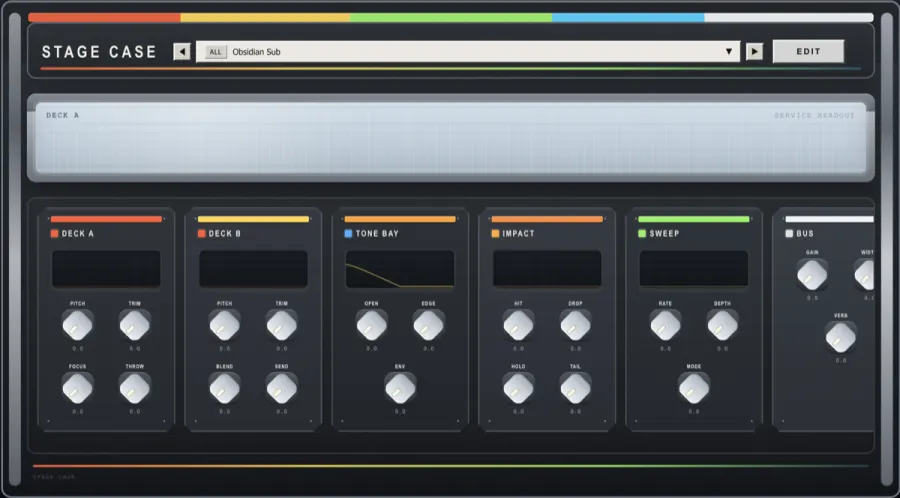
Interface direction for the Reese bass proof page.
What a Studio 56 Reese brief can look like
Brief
Dark Reese bass with motion
Example brief: "Make me a dark Reese bass synth with pitch envelope, formant movement, and enough low-end weight for trap and bass music."
Expected output
A playable bass instrument
The result should prioritize weight, movement, and simple macro control instead of feeling like a generic bass preset inside a broad synth.
What this example establishes today
The point is to make the expected output legible even before richer media is added.
- Brief family: dark Reese bass with pitch envelope, formant movement, and low-end weight.
- Current public workflow: brief to standalone Mac synth, with VST3 export available on Pro.
- Best read as a bass-design workflow example, not a claim that every Reese variation is solved the same way.
Why this example matters
Reese requests are a good test of whether the workflow can handle specific producer language.
- Bass music and trap ideas
- Dark low-end writing with movement
- Track-specific bass instruments instead of preset browsing
What would make this page more citable
The next layer is evidence, not more hype language.
- A screenshot showing the finished interface
- A short audio clip demonstrating movement and weight
- A concise note on the core macro controls
Keep exploring
Follow the closest product, comparison, and proof pages from here.
See Studio 56 for beatmakers
This is the nearest audience page when the goal is bass design around one beat or low-end role.
Open beatmakers pageCompare Serum vs Studio 56
Use this comparison when you are deciding between a manual synth workflow and a faster brief-to-instrument path.
Open comparisonGet Studio 56 for Mac
Move from this example into the live Mac workflow.
Get Studio 56 for Mac